

GSoC Project Ideas 2026
Tip
Do you want to apply with us?
We have a page that describes how to increase your chances of success. Please read it carefully.
General suggestions and warnings
Project ideas describe the goals we want to achieve but may miss details that have to be defined during the project: we expect applicants to do their own research, propose solutions and be ready to deal with uncertainty and solve challenges that will come up during the project
Code and prototypes are preferred over detailed documents and unreliable estimates: rather than using your time to write a very long application document, we suggest to invest in writing a prototype (which means the code may be thrown out entirely) which will help you understand the challenges of the project you want to work on; your application should refer to the prototype or other Github contributions you made to OpenWISP that show you have the capability to succeed in the project idea you are applying for.
Applicants who have either shown to have or have shown to be fast learners for the required hard and soft skills by contributing to OpenWISP have a lot more chances of being accepted: in order to get started contributing refer to the OpenWISP Contributing Guidelines
Get trained in the projects you want to apply for: once applicants have completed some basic training by contributing to OpenWISP we highly suggest to start working on some aspects of the project they are interested in applying: all projects listed this year are improvements of existing modules so these modules already have a list of open issues which can be solved as part of your advanced training. It will also be possible to complete some of the tasks listed in the project idea right now before GSoC starts. We will list some easy tasks in the project idea for this purpose.
Project Ideas
Automatic Extraction of OpenWrt Firmware Image Metadata
Important
Languages and technologies used: Python, Django, Celery, OpenWrt, REST API.
Mentors: Federico Capoano, Alexandre Vincent, Sankalp, Aryaman.
Project size: 350 hours.
Difficulty rate: medium/hard.
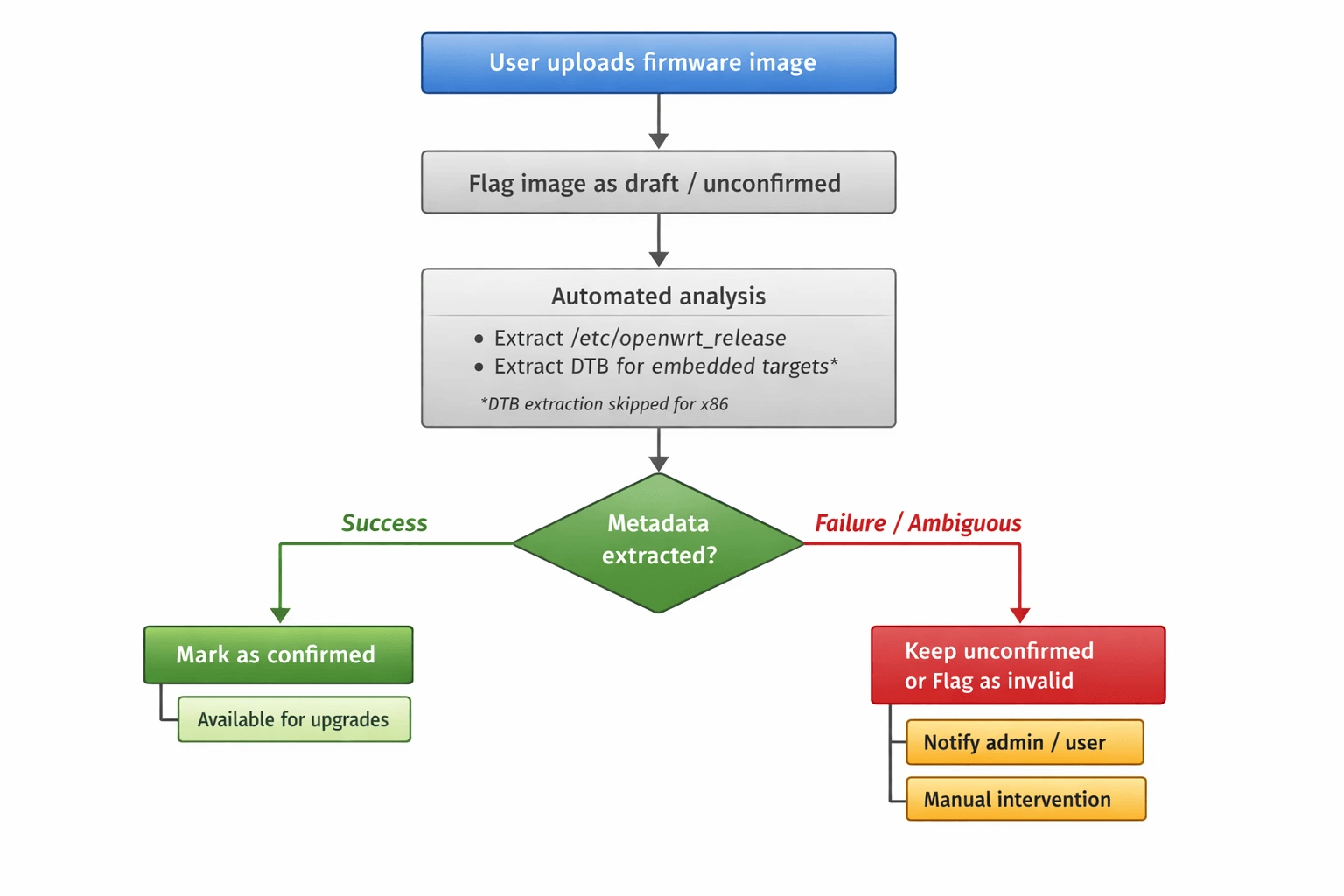
This GSoC project aims to improve the user experience of OpenWISP Firmware Upgrader by automatically extracting metadata from OpenWrt firmware images at upload time.
When uploading firmware images to OpenWISP Firmware Upgrader, users are currently required to manually provide metadata such as the image identifier, target, and board compatibility. This workflow is error prone, confusing for less experienced users, and does not scale as the number of supported images grows.
Recent investigations revealed that most of the information requested from users is already present inside the firmware images, but extracting it reliably requires understanding the image format, compressed kernels, and device tree structures.
Expected outcomes
Introduce logic in OpenWISP Firmware Upgrader to automatically extract metadata from OpenWrt firmware images upon upload, using it to pre-fill and validate image fields.
Initial upload
Images are flagged as unconfirmed / draft immediately after upload.
Draft status prevents images from being used for upgrades until analysis completes successfully.
Automated analysis (background Celery task)
Analysis happens asynchronously in the background using Celery (we already use it heavily, so this fits right in).
Primary metadata extraction method: OpenWrt
sysupgradeimages already contain JSON metadata embedded by thefwtoolutility. This metadata includes:version.distandversion.version→ OS identifierversion.target→ target and architectureversion.boardandsupported_devices→ board compatibilityExtraction is fast and does not require decompression.
A minimal Python implementation for reference: extract_metadata.py
Fallback method (for images without
fwtoolmetadata, e.g., non-sysupgradeimages): May require kernel decompression and Device Tree Blob (DTB) extraction. See implementation notes below for details.x86&armvirt: These are disk images withoutfwtoolmetadata; no board concept exists. Manual metadata input is required.Other compile targets may lack
fwtoolmetadata; more research is needed, please include your findings in your GSoC proposal.
Images remain unconfirmed and invisible for upgrade operations while analysis runs.
Basic file header validation should reject obviously invalid files (JPEGs, PDFs, etc.) early on.
Post-analysis outcomes
Images can end up in several states:
Success: metadata extracted cleanly → mark image as confirmed, making it available for upgrades.
Analysis in progress: extraction is running.
Failed - requires manual intervention: extraction didn't work, but user can manually fill in the metadata.
Invalid: clearly garbage file that can't possibly be a firmware image.
Manually confirmed: user overrode auto-extracted data (we need this because sometimes our extraction might be wrong and users will be annoyed if they can't fix it).
For failures:
File is clearly invalid/garbage → reject immediately if possible with a fast validation error. Otherwise, discard in the background and notify the user with a
generic_notification.Image format is new or unsupported → notify via
generic_notificationand allow manual intervention via admin UI or REST API (fill metadata or delete/reupload).Out-of-memory during decompression → notify user, explain they may need to increase memory limits and reupload.
Gray-area failures (partial extraction, multiple boards detected) fall under scenario 2.
Warning
Metadata should be editable until the image is confirmed or paired with devices. After that, it becomes read-only - otherwise things break and it's too painful to handle all the edge cases.
Other constraints
Test coverage must not decrease, tests must follow the specs described in the "Testing strategy" section below.
Documentation needs to be updated to account for this feature, including updating any existing screenshots that may change the look of the UI after implementation.
Once the project is completed, we will need a short example usage video for YouTube that we can showcase on the website/documentation.
Build-level status
Since builds are collections of images, we should add a status field to builds too:
A build shouldn't be usable for mass upgrades until all its images have completed metadata extraction.
The admin list view should show the status for builds so users know what's ready to use.
Dynamic status: If new images are added to a build later (via admin or API), the build status should change back to "analyzing".
Completion notification: When analysis completes for a build (all images done), send the user a
generic_notificationwith a link to the build page. Clicking the notification should take them straight to the updated build so they can see the results and take action if needed.
Safety rules
System must prevent using unconfirmed images for single or batch upgrades.
System must prevent launching batch upgrades for builds where metadata extraction hasn't completed.
System must not pair unconfirmed images with devices (existing or new) based on OS identifier and hardware model.
Once an image is confirmed, the existing auto-pairing mechanism kicks in.
Implementation notes
Primary extraction method: Firmware images built with OpenWrt's build
system already contain JSON metadata embedded via the fwtool utility.
This has been standard practice for years and is present in all
sysupgrade images, including custom builds. The metadata can be
extracted quickly without decompression. A minimal Python implementation
demonstrating this approach is available for reference:
extract_metadata.py.
Fallback extraction method: For images without fwtool metadata
(non-sysupgrade images, x86 / armvirt disk images, or edge
cases), extraction may require decompressing the kernel and extracting the
Device Tree Blob (DTB). Contributors should research established tools and
techniques for this (e.g., kernel decompression, binwalk for DTB
location) rather than reinventing solutions. The specific implementation
details are left to the contributor's research.
Memory management: While fwtool metadata extraction does not
require decompression, fallback methods might. For cases requiring
decompression:
Make memory limits configurable with reasonable defaults.
Handle out of memory errors in the background task and notify users via
generic_notification.Implement limits on max decompression output size to prevent zip bomb-style attacks.
Timeouts: Use the same task timeouts we already use for firmware upgrades.
Retries: Probably not worth auto-retrying failed extractions - if it fails once, it'll likely fail again. Users can just upload again if it was a transient issue.
Task crashes: Treat as failure, notify user, fallback to manual intervention.
Extensibility: the mechanism for extracting metadata varies across operating systems.
Although OpenWISP currently focuses exclusively on OpenWrt, it also manages devices running OpenWrt derivatives which can have varying degrees of difference with the standard OpenWrt source code.
To handle these differences, this module uses the concept of an Upgrader Class. Therefore, the logic described here should be implemented in a similar object-oriented structure, allowing for customization, extension, or complete override if needed. Each upgrader class must have a related metadata extraction class.
Benefits
Users cannot accidentally upgrade devices with invalid images.
Partial or malformed uploads are quarantined safely.
Metadata extraction improves incrementally without impacting system safety.
Eliminates the need to maintain a hard-coded list of supported devices (
hardware.py).Simplifies end-user experience significantly.
Testing strategy
We need to test this with real firmware images, but we can't bloat the repo:
Test one firmware image for each supported type.
Store images on
downloads.openwisp.io(public HTTP access) with checksums stored in the repo for security.Integration tests download and cache images; only re-download if checksum changes.
Directory structure is an open question - anything reasonable works.
We can use official OpenWrt builds for testing; maintainers will upload them to
downloads.openwisp.io.
Additional context and research findings
``fwtool`` metadata: OpenWrt has embedded JSON metadata in
sysupgradeimages for years via thefwtoolutility. This metadata is reliable and contains all essential information (OS identifier, target, board, supported devices).``sysupgrade`` vs disk images: Only
sysupgradeimages containfwtoolmetadata.x86andarmvirtimages are disk images and lack this metadata. Contributors should investigate whether other compile targets produce disk images./etc/board.jsonand/tmp/sysinfo/*are runtime generated and not present in firmware images.For embedded targets without
fwtoolmetadata, the only authoritative board identity pre-installation is the DTB in the kernel.x86is a fundamental exception: no board concept exists, images are target wide.rootfsimages (*-squashfs-rootfs.img) are not suitable for upgrades and should not be treated as fully valid.A draft/unconfirmed workflow ensures the system remains safe while extraction runs or fails.
The issue containing design and implementation notes is available at: #378.
Downsides and challenges
Complexity in handling all existing firmware image types across supported OSes.
Requires robust handling of compressed kernels, DTB extraction, and image format edge cases.
Out of scope for small projects; needs dedicated effort and assistance from an OpenWrt expert.
Security: while only network admins can upload images currently (so we trust the user), we should add basic protections like file header validation and decompression limits.
Open questions for contributors
Non-``sysupgrade`` images: How should we handle images without
fwtoolmetadata (x86,armvirtdisk images, and potentially other targets)? Are there other compile targets that produce disk images instead ofsysupgradeimages? What is the best approach for these cases?Manual override workflow: Design the complete admin UI flow for when extraction fails. What does the user see? How do they enter metadata manually? How do we validate their input?
Cross-version compatibility: OpenWrt versions from 18.06 to 24.10 may have different metadata formats. How do we handle this? Should we detect the version and adjust extraction logic?
Downloading fw images for testing: Best practices for downloading test images: part of test setup or separate command? How to handle caching efficiently?
Decompression limits: For fallback methods requiring decompression, what's a reasonable default for maximum decompressed size? How do we detect compression bombs early?
Status UI: What should the admin interface look like for showing analysis status? Status badges? Progress indicators? How do we communicate "this image is being analyzed" vs "this needs your attention"?
Error granularity: How detailed should failure messages be? Technical details for admins vs. user-friendly summaries?
Derivatives and non OpenWrt firmware: How do you intend to structure the code so that each Upgrader Class has its own metadata extraction logic?
Prerequisites to work on this project
Applicants must demonstrate a solid understanding of:
Python, Django, and JavaScript.
REST APIs and background task processing (Celery).
OpenWrt image formats and basic Linux tooling.
Experience with OpenWISP Firmware Upgrader is essential. Contributions or resolved issues in this repository are considered strong evidence of the required proficiency.
WiFi Login Pages Modernization
Important
Languages and technologies used: JavaScript, Node.js, React.
Mentors: Federico Capoano, Sankalp, Gagan Deep.
Project size: 175 hours (medium).
Difficulty rate: medium.
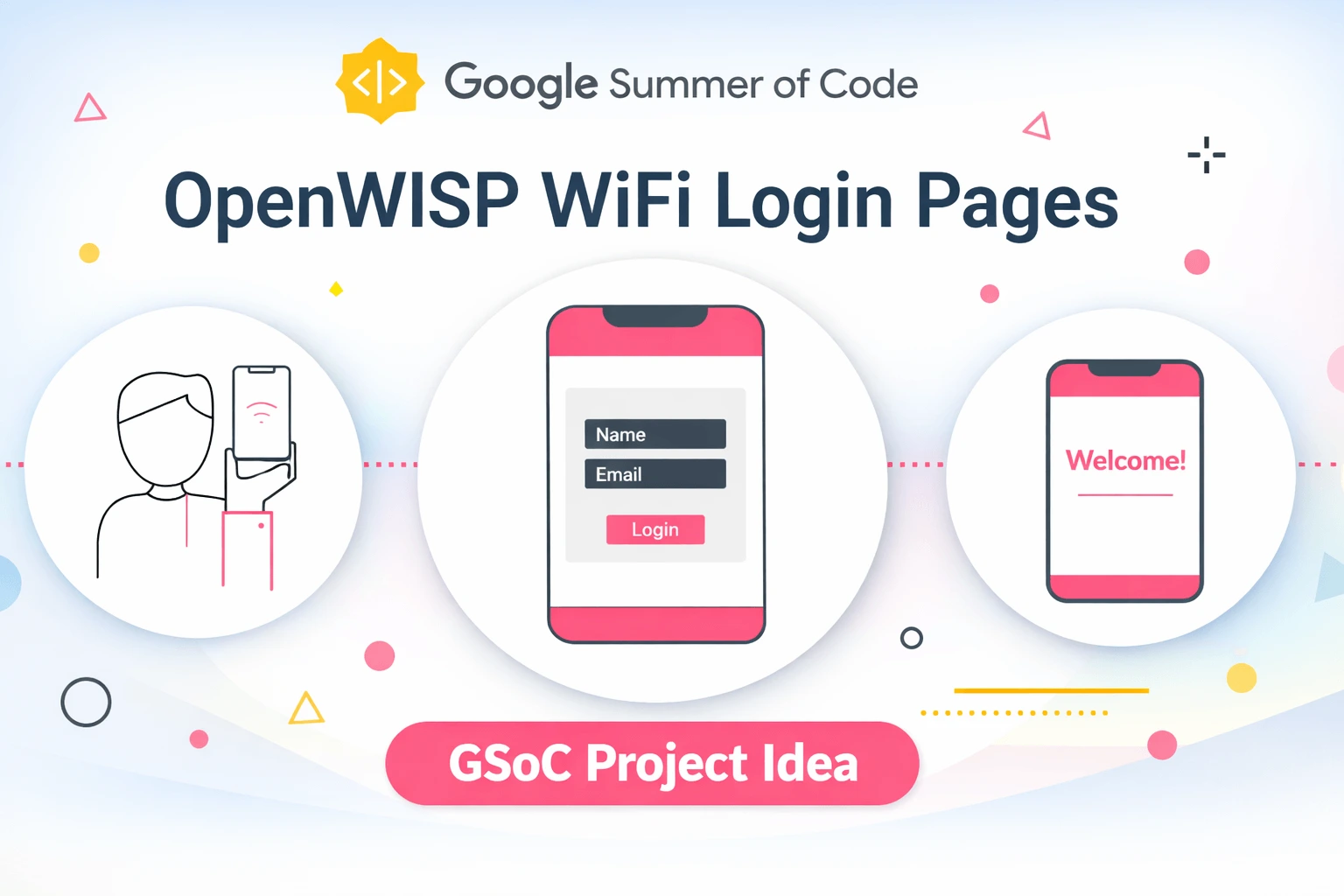
This project aims to modernize the OpenWISP WiFi Login Pages application, which provides splash page functionality for WiFi hotspot networks. The focus is on codebase improvements, architectural refactoring, dependency upgrades, and new features to enhance maintainability and user experience.
All refactoring work should maintain backward compatibility, since users interact with the application through their browsers, these internal code changes should be transparent to them.
Key Objectives
Code Refactoring and Architecture Improvements
The following structural improvements will enhance code maintainability and reduce technical debt:
Refactor status component to simplify logic and improve maintainability (#918)
The status component in
client/components/status/status.jshas grown to handle multiple responsibilities including authentication, verification, payment, session management, captive portal logic, and UI rendering. This makes the codebase difficult to understand and maintain, increases the risk of bugs, and makes testing more difficult. The component should be refactored to separate concerns and improve maintainability.Move redirect logic from OrganizationWrapper to each component (#272)
Currently, redirection logic is defined in the OrganizationWrapper component, which is re-rendered every time
setLoading()is called. This causes multiple unnecessary HTTP requests and potential issues with external redirects (e.g., payment gateways). The redirect logic should be moved to individual components where it belongs, making OrganizationWrapper leaner.Eliminate redundancy of header HTML (#314)
The header HTML is duplicated with separate desktop and mobile versions. This redundancy makes customization painful as it requires double the work. The header should be refactored to use a single HTML structure with responsive CSS to handle different screen sizes.
Add support for captive-portal API (#947)
Modern captive portals support RFC 8908 Captive Portal API. This feature should be implemented as an optional feature (turned off by default) that adds support for:
Checking if captive portal login is required
Detecting "internet-mode" status
Configurable timeout (default 2 seconds) per organization
Configurable API URL per organization via YAML configuration
Proper documentation of the feature
Fallback to existing internet mode feature for browsers/devices without Captive Portal API support
Upgrade to latest version of React (#870)
Upgrade the application from its current React version to React 19. Contributors should research whether to perform the upgrade before or in parallel with refactoring tasks, considering that upgrading first may enable modern patterns but could introduce breaking changes. The upgrade involves:
Upgrading to React 18.3 first to identify deprecation warnings
Running official React 19 codemods for automated refactoring
Updating all React-related dependencies (react-dom, react-router, react-redux, etc.)
Migrating away from Enzyme (deprecated) to React Testing Library (RTL). Contributors should propose a migration strategy that balances thoroughness with contributor workload, whether to migrate all tests at once or incrementally alongside the React upgrade.
Ensuring all dependencies are compatible with React 19
Comprehensive testing to catch regressions
Prerequisites to work on this project
Applicants must demonstrate a solid understanding of:
JavaScript (ES6+) and modern frontend development practices.
React components, hooks, state management, and testing.
Node.js and npm/yarn package management.
Experience with OpenWISP WiFi Login Pages is essential. Contributions or resolved issues in this repository are considered strong evidence of the required proficiency.
Implementation Approach
Each task should be delivered as a separate pull request (one PR per task), following standard OpenWISP practices. This enables incremental review and reduces risk.
Testing Strategy
Testing should follow these guidelines:
TDD (Test-Driven Development) is recommended but not mandatory, use judgment based on the specific task.
Test coverage levels for refactored components should not decrease from current levels.
For the captive-portal API feature, mocked tests are acceptable.
Browser support follows the existing
browserslistnpm package configuration covering major browsers.
Expected Outcomes
A refactored, more maintainable status component with clear separation of concerns.
Redirect logic moved from OrganizationWrapper to individual components.
A unified header component using responsive CSS instead of duplicated HTML.
Implementation of RFC 8908 Captive Portal API support as an optional, configurable feature per organization (via YAML configuration).
Successfully upgraded React to version 19 with all dependencies updated and Enzyme replaced by React Testing Library.
Comprehensive automated tests covering refactored components and new features. Test coverage should be maintained at current levels.
Updated documentation, including:
Migration guide for the React upgrade.
Usage instructions for the new captive-portal API feature.
A short example usage video for YouTube that we can showcase on the website.
Mass Commands
Important
Languages and technologies used: Python, Django, JavaScript, WebSockets, REST API.
Mentors: Federico Capoano, Gagan Deep, Sankalp, Kapil Bansal.
Project size: 350 hours.
Difficulty rate: medium.
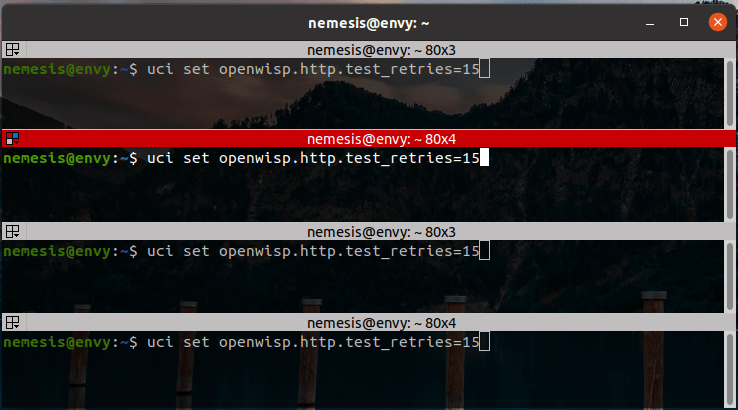
This project idea aims to extend OpenWISP's remote device management capabilities by enabling users to execute shell commands on multiple devices simultaneously. Currently, OpenWISP supports executing commands on a single device at a time. This project will introduce a bulk execution feature while maintaining the existing security, rules, and limitations of the single-device command execution feature.
The mass command operation will be accessible from two main entry points:
An admin action on the device list page, allowing users to select multiple devices and send a shell command in bulk.
A dedicated mass command admin section, where users can initiate bulk command execution with various targeting options:
All devices in the system (restricted to superusers).
All devices within a specific organization.
All devices within a specific device group.
All devices within a specific geographic location.
Specific selected devices.
The UI will guide users step-by-step, dynamically displaying relevant fields based on the selected target scope. For example, if a user selects "All devices in a specific organization", an auto-complete list of organizations will be displayed next.
The system will provide real-time tracking of command execution results. Inspired by OpenWISP Firmware Upgrader's mass upgrade feature, the UI will receive live updates via WebSockets, displaying command output as soon as it is received from the devices. Additionally:
The device detail page will show executed commands under the "Recent Commands" tab.
Commands that were part of a mass operation will be clearly marked, with a link to the corresponding mass command operation page.
To support API-based management, the REST API will be extended with the following capabilities:
Create new mass command operations.
Retrieve mass command operations and their results (with pagination).
Delete mass command operations.
Modify the single-shell command API to reference the mass command operation ID if applicable.
Prerequisites to work on this project
Applicants must demonstrate a solid understanding of Python, Django, HTML, CSS, JavaScript, WebSockets, and OpenWISP Controller.
Expected outcomes
Implementation of mass shell command execution in OpenWISP, replicating the rules and limitations of single-device execution.
Development of an intuitive UI with the Django admin for selecting devices and tracking command results in real-time.
Admin action for device list page.
Enhancement of the device detail page to reflect mass command history for individual devices.
Extension of the REST API to support mass command operations.
Comprehensive automated tests covering the new feature.
Updated documentation, including:
Feature description with usage instructions.
A short example usage video for YouTube that we can showcase on the website.
X.509 Certificate Generator Templates

Important
Languages and technologies used: Python, Django, JavaScript.
Mentors: Federico Capoano, Aryaman.
Project size: 175 hours.
Difficulty rate: medium.
This GSoC project aims to enhance OpenWISP's certificate management capabilities by enabling the generation of x509 certificates for general-purpose use, beyond OpenVPN.
Currently, OpenWISP supports generating x509 certificates exclusively for OpenVPN clients, where each VPN client template produces a certificate signed by the CA linked to the corresponding VPN server. However, many users require x509 certificates for other purposes, such as securing web services, internal APIs, or device authentication outside of VPN usage.
The proposed solution introduces a new certificate template type that
allows users to generate x509 certificates using a selected Certificate
Authority (CA), while fully reusing the existing certificate
infrastructure provided by django-x509.
Certificate template model and scope
The new template type will reference an existing x509 certificate object, which acts as a reusable blueprint for certificate generation.
The relation to the certificate object is optional:
If a certificate template is specified, its non-unique properties are copied when generating per-device certificates
If no certificate template is specified, certificate properties default to the selected CA's standard settings
The referenced certificate object is never issued or assigned to devices directly and is used exclusively as a template.
No custom certificate profile system will be introduced. Only fields
already supported by django-x509 may be used.
Device property integration
Certificates generated from templates shall include device specific properties resolved at generation time.
Supported device properties include:
Device hostname
Device MAC address
Device UUID
These values may be included in:
Standard subject fields supported by
django-x509, the hostname in particular shall be used as common nameCustom x509 extensions stored in the existing
extensionsJSON field, using private OIDs
Device properties are resolved only when a template is assigned to a device.
Certificates are automatically regenerated if the device's hostname or MAC
address fields are modified. This behavior must be explicitly stated in
the documentation; additionally, a UI notification of type
generic_message must be triggered once the regeneration process is
complete.
Certificate lifecycle and ownership
Certificates are generated when a certificate template is assigned to a device, following the same lifecycle semantics as existing OpenVPN client certificates.
Assignment generates a new certificate
Unassignment revokes the certificate
Renewal regenerates the certificate
No standalone certificates are generated without device assignment
Certificates are always associated with a CA, and revocation is handled through the CA's existing Certificate Revocation List (CRL) mechanism. No additional revocation logic will be introduced.
Storage, access, and security model
Private keys and certificates are stored and protected using the existing
django-x509 mechanisms.
This project will not introduce:
New encryption schemes
New private key download endpoints
New permission models
Existing OpenWISP access controls and organization scoping rules apply.
Configuration management integration
Certificate details will be exposed to OpenWISP's configuration management system as template variables, including:
Certificate (PEM)
Private key (PEM)
Certificate UUID
Variable names will follow a UUID-based namespace to ensure uniqueness and avoid conflicts with existing OpenWISP variables.
Certificate renewal triggers cache invalidation and configuration updates to affected devices. No configuration updates are triggered unless a certificate is renewed or regenerated.
API and admin interface
The new certificate template type will be available through:
Django admin
Existing REST API template endpoints
No new API endpoints will be introduced. Existing RBAC and organization scoping rules will apply.
Testing and documentation
The project requires:
Automated tests covering certificate generation and lifecycle behavior
Admin UI integration tests
API tests
Selenium browser tests
Short video demonstration
Documentation updates include:
A dedicated documentation page describing certificate templates
Step-by-step usage instructions
Clear explanation of supported options and limitations
Out of scope
The following items are explicitly out of scope for this project:
Subject Alternative Name (SAN) support
OCSP integration
Automated public CA issuance (e.g. Let's Encrypt)
Custom cryptographic policy engines
Changes to existing OpenVPN certificate behavior
Prerequisites to work on this project
Applicants must demonstrate a solid understanding of Python, Django, and JavaScript.
Experience with OpenWISP Controller and django-x509 is essential. Contributions or resolved issues in these repositories are considered strong evidence of the required proficiency.
Add more timeseries database clients to OpenWISP Monitoring
Important
Languages and technologies used: Python, Django, InfluxDB, Elasticsearch.
Mentors: Federico Capoano, Clément Beaujoin, Kapil Bansal, Sankalp, Gagan Deep.
Project size: 350 hours.
Difficulty rate: medium.
The goal of this project is to add more Time Series DB options to OpenWISP while keeping good maintainability.
Prerequisites to work on this project
The applicant must demonstrate good understanding of OpenWISP Monitoring, and demonstrate basic knowledge of NetJSON format, InfluxDB and Elasticsearch.
Expected outcomes
Complete the support to Elasticsearch. Support to Elasticsearch was added in 2020 but was not completed.
The old pull request has to be updated on the current code base
The merge conflicts have to be resolved
All the tests must pass, new tests for new charts and metrics added to InfluxDB must be added (see [feature] Chart mobile (LTE/5G/UMTS/GSM) signal strength #270)
The usage shall be documented, we must make sure there's at least one dedicated CI build for Elasticsearch
We must allow to install and use Elasticsearch instead of InfluxDB from ansible-openwisp2 and docker-openwisp
The requests to Elasticsearch shall be optimized as described in [timeseries] Optimize elasticsearch #168.
Add support for InfluxDB 2.0 as a new timeseries backend, this way we can support both
InfluxDB <= 1.8andInfluxDB >= 2.0.All the automated tests for InfluxDB 1.8 must be replicated and must pass
The usage and setup shall be documented
We must make sure there's at least one dedicated CI build for Elasticsearch
We must allow choosing between InfluxDB 1.8 and InfluxDB 2.0 from ansible-openwisp2 and docker-openwisp.
OpenWISP VPN Deployer Linux Package

Important
Languages and technologies used: Linux, Python, Django, WebSockets, OpenVPN, WireGuard, WireGuard over VXLAN, ZeroTier.
Mentors: Federico Capoano, Gagan Deep, Oliver Kraitschy, Aryaman.
Project size: 350 hours.
Difficulty level: medium/hard.
This GSoC project aims to simplify the deployment and management of VPN servers integrated with OpenWISP.
The goal is to develop an easy-to-install program that automates the deployment of VPN servers synchronized with OpenWISP in real time. This reduces manual intervention and ensures configuration consistency between the VPN server objects in the OpenWISP database and the deployed VPN instances.
Key Features
The program will run on Linux-based servers and will:
Be implemented in Python to ensure maintainability and extensibility, it should be a Python package installable via
pip.Use a Makefile to generate installation packages for major Linux distributions:
DEB (for Debian, Ubuntu, and related distributions)
RPM (for Red Hat, Fedora, and similar systems)
Provide Docker support to run the VPN deployer as a containerized service, enabling easy deployment alongside docker-openwisp. We suggest running the deployer and VPN server(s) within the same container to keep the architecture simple, using host networking mode. Configuration management could be achieved via a configuration file (YAML is recommended for readability) mountable into the container. Contributors should verify these suggestions through research and propose the most suitable approach for their implementation.
Establish a WebSocket connection with OpenWISP to listen for changes in VPN server configurations and synchronize local settings accordingly. The connection should handle reconnection automatically. We suggest retrying WebSocket connections indefinitely and using exponential backoff for HTTP requests, but contributors should propose a robust reconnection strategy.
Keep the local list of peers updated whenever VPN clients are added, removed, or modified.
Receive real-time updates via WebSocket when certificate revocation occurs, ensuring the Certificate Revocation List (CRL) is always current. The deployer needs to handle OpenVPN server reload when CRL updates are received. Initial research indicates that OpenVPN does not automatically reload CRL files when they change, and that sending a
SIGUSR1signal to the OpenVPN process may reload the CRL without disconnecting existing clients. Contributors must verify this approach and propose the best solution based on their findings.Support the following VPN tunneling technologies (in order of implementation priority):
OpenVPN (most complex due to CRL requirements)
WireGuard
ZeroTier
WireGuard over VXLAN (VXLAN part is tricky)
Provide a command-line utility to simplify the initial setup. This utility will:
Guide users step by step, making it accessible even to those with limited experience.
Support non-interactive/scripted mode for automation and Docker deployments (minimal implementation).
Allow users to select the VPN technology to be deployed.
Verify that the necessary system packages are installed and provide clear warnings if dependencies are missing. We suggest maintaining a mapping of required packages per distribution and VPN technology, as package names vary between Linux distributions (e.g., Debian
openvpnvs. RHELopenvpn), but contributors should propose their approach.Store configuration in a YAML configuration file (mountable in Docker environments). Other formats may be considered if justified.
Assist in securely connecting and synchronizing with OpenWISP.
Note
The command-line utility must apply all necessary changes in the OpenWISP database via the REST API. If any required modifications cannot be performed with the current API, the contributor will be responsible for implementing the missing functionality.
To facilitate authentication, the utility will guide users in retrieving their OpenWISP REST API token. A proposed approach is to provide a link to the OpenWISP admin interface, where users can generate and copy their API token easily. The WebSocket connection should authenticate using this API token.
Support running multiple instances, where each instance manages a separate VPN server independently. Each instance could be identified by a dedicated configuration file or other suitable mechanism.
Implement structured logging with dedicated log files for each instance, adhering to Linux logging best practices and supporting log rotation.
Provide comprehensive documentation in ReStructuredText format, following OpenWISP conventions:
Documentation will be stored in a
/docsdirectory, with a clear separation between user guides and developer documentation.A video demonstration will be included, which can be published on YouTube to increase project visibility.
Update the OpenWISP documentation to cover installation, configuration, and best practices.
To support this project, OpenWISP Controller will need to be updated as follows:
Expose a WebSocket endpoint to allow the VPN synchronization program to receive real-time configuration updates.
Automatically include the Certificate Revocation List (CRL) in generated OpenVPN server configurations. The CRL content should be provided as a configuration variable (e.g.,
crl_content, similar to x509 certificates), eliminating the need for manual CRL file management. The CRL file path should be determined as part of the implementation. When certificates are revoked, the system must trigger WebSocket notifications to connected VPN deployer instances to ensure immediate CRL updates. Additionally, the deployer should periodically poll the CRL checksum via HTTP API as a redundancy measure.Define a permission model for the VPN deployer: the deployer requires a dedicated user account with organization manager role and permissions to add/change VPN servers within that organization.
Prerequisites to work on this project
Applicants should have a solid understanding of:
Python and Django.
WebSockets.
Experience with OpenWISP Controller is essential. Experience with django-x509 netjsonconfig is considered as a strong favorable point. Contributions in these repositories are considered strong evidence of the required proficiency.
At least one of the supported VPN technologies (OpenVPN, WireGuard, WireGuard over VXLAN, ZeroTier).
System administration and Linux packaging (preferred but not required).
Expected Outcomes
A Python-based VPN synchronization tool.
A command-line setup utility for easy first-time configuration.
WebSocket-based synchronization between VPN servers and OpenWISP.
Automated packaging for major Linux distributions (DEB and RPM).
Docker support for running the VPN deployer as a containerized service, including integration with docker-openwisp.
Structured logging with proper log rotation.
Enhancements to OpenWISP Controller:
Support for WebSocket-based synchronization.
Automatic inclusion of Certificate Revocation List (CRL) in OpenVPN server configurations with variable-based CRL content.
WebSocket notifications triggered when certificates are revoked.
Any required REST API modifications.
Automated tests to ensure reliability and stability:
Unit tests with mocks for both openwisp-controller and VPN server interactions to enable fast development and testing of individual components.
Integration tests using real openwisp-controller and VPN server instances to test core functionality: installation, configuration synchronization, and basic VPN server health checks. While initially minimal, these provide reliability and establish a foundation for expanded integration testing as the project matures and sees wider adoption.
Comprehensive documentation, including setup guides and best practices.
A short tutorial video demonstrating installation and usage.
Persistent & Scheduled Firmware Upgrades

Important
Languages and technologies used: Python, Django, Celery, REST API, JavaScript.
Mentors: Federico Capoano, Gagan Deep.
Project size: 350 hours.
Difficulty rate: medium.
This project aims to enhance OpenWISP Firmware Upgrader with two complementary features that improve reliability and operational flexibility for mass firmware upgrades: persistent retries for offline devices (#379) and scheduled execution for planned maintenance windows (#380).
Currently, firmware upgrades in OpenWISP happen immediately via Celery tasks. If a device is offline at the moment of upgrade, the task fails and requires manual retry. In large deployments, this becomes unmanageable. Additionally, network operators need the ability to schedule upgrades during low-usage windows without manual intervention at execution time.
Expected outcomes
Introduce support for persistent mass upgrades that automatically retry for offline devices and scheduled mass upgrades that execute at a user-defined future time.
Persistent mass upgrades (#379)
Mass upgrade operations should be able to retry indefinitely for devices that are offline at the initial execution time.
Add a
persistentboolean field to mass upgrade operations (visible in admin and REST API, checked by default, immutable after creation).Track retry count and scheduled retry time in the
UpgradeOperationmodel.Implement device online detection:
Prefer using the
health_status_changedsignal from OpenWISP Monitoring (with mocking for testing).Fallback: periodic retries with randomized exponential backoff (configurable, max once every 12 hours).
Implement retry strategy:
Randomized exponential backoff with indefinite retries.
Periodic reminders (default every 2 months) via
generic_notificationto admins about devices still pending upgrade, with links filtering pending devices.Continue until admin cancels or all devices are upgraded.
Integration with Celery: Use a new Celery task to "wake up" pending upgrades, with randomized delays to prevent system overload.
Failure handling: Use
generic_notificationfor failures requiring attention (devices offline too long, upgrade errors).Edge cases: Handle concurrent signal triggers, ensure only one upgrade per device, no rollback support needed.
Scheduled mass upgrades (#380)
Allow users to schedule mass upgrades for future execution.
UI: Add optional datetime scheduling on mass upgrade confirmation page. Default is immediate execution unless a future datetime is set.
Validation: Scheduled datetime must be:
In the future
Respect minimum delay (e.g., 10 minutes)
Not exceed maximum horizon (e.g., 6 months)
Timezone handling: User input in browser timezone, storage in UTC, server timezone clearly indicated in UI.
Status model: Extend to include
scheduledstate with transitions: scheduled → running, scheduled → canceled, scheduled → failed.Execution model: Use Celery Beat periodic task (every minute) to scan and execute due upgrades. Avoid Celery eta/countdown for reliability with far-future tasks.
Runtime validation: Re-evaluate devices, permissions, firmware availability at execution time. Cancel with error if all targets become invalid.
Conflict prevention: Prevent creating conflicting mass upgrades (scheduled or immediate) when one is already pending.
Notifications: Send
generic_notificationwhen scheduled upgrades start and complete.
Combined features
Scheduled upgrades should also support persistence. A scheduled upgrade that starts but has offline devices should continue retrying according to the persistence logic.
General requirements
Operations editable only while in
scheduledstatus.Clear exposure of scheduled status and datetime in admin list, detail view, and REST API.
Full feature parity between Django admin and REST API.
Testing and documentation
Test coverage must not decrease from current levels.
Browser tests for the scheduling UI and admin interface workflows are required.
Documentation has to be kept up to date, including:
Usage instructions for persistent and scheduled upgrades.
Updated screenshots reflecting UI changes.
One short example usage video per each feature.
Prerequisites to work on this project
Applicants must demonstrate a solid understanding of:
Python, Django, and JavaScript.
REST APIs and background task processing (Celery, Celery Beat).
Timezone handling and datetime management.
Experience with OpenWISP Firmware Upgrader is essential. Contributions or resolved issues in this repository are considered strong evidence of the required proficiency.
Open questions for contributors
Persistence implementation: What is the optimal database schema for tracking persistent upgrade state while maintaining compatibility with existing upgrade operation models?
Scheduling mechanism: How exactly should the Celery Beat periodic task be configured to reliably detect and execute due scheduled upgrades without performance issues?
Timezone UX: What is the best way to handle timezone display and input in the admin interface to minimize user confusion?
Backoff strategy: What are the optimal parameters for randomized exponential backoff (initial delay, max delay, randomization factor)?
Conflict detection: How should conflicting operations be detected and prevented? What defines a "conflict"?
Monitoring integration: How exactly should the
health_status_changedsignal from OpenWISP Monitoring be integrated for optimal online detection?Notification frequency: What are the optimal default periods for reminder notifications about pending persistent upgrades?
Edge case handling: How should edge cases be handled, such as devices that are offline for months, or mass upgrades with very large device counts?
Resource Aware Priority Task Scheduling for OpenWISP

Important
Languages and technologies used: Python, Django, Celery, gevent.
Mentors: Federico Capoano, Gagan Deep, Kapil Bansal.
Project size: 350 hours.
Difficulty rate: medium/hard.
This project aims to improve task execution in OpenWISP Monitoring by implementing resource-aware priority scheduling and migrating I/O-bound tasks to gevent for better concurrency.
The deliverable is a reusable Python package for priority scheduling that benefits the entire Celery ecosystem, plus OpenWISP Monitoring running efficiently with gevent.
Problem Statement
OpenWISP currently runs multiple Celery workers, typically assigning one worker per queue. This approach ensures that high priority operations such as network management tasks are not blocked by lower priority workloads like monitoring or housekeeping. However, this architecture introduces several challenges:
Deployment complexity increases due to multiple workers and queue assignments.
Scaling requires manual tuning of worker concurrency (
--autoscale=X,Yvalues must be guessed).Small deployments waste resources because workers may remain idle.
Large deployments require predicting capacity in advance.
No automatic adjustment based on actual system resources (CPU, memory).
With the constant growth of networks, users need OpenWISP to be able to manage more devices with the same resources.
OpenWISP Monitoring specifically performs thousands of I/O-bound tasks
(ping checks, HTTP requests, device polling) that could benefit from high
concurrency via gevent, but currently uses blocking operations (fping)
that prevent this.
The project will create a resource and priority aware scheduler that works well in OpenWISP with the gevent/thread execution pools.
Project Goals
The contributor will design and implement a scheduling system with the following capabilities:
Priority Aware Scheduling
Reserve guaranteed execution capacity for high-priority tasks.
Allow lower-priority tasks to use unused reserved capacity.
Prevent starvation: every priority tier gets execution slots.
Provide configurable priority classes (e.g., critical, high, normal, low).
Resource Aware Autoscaling
Dynamically adjust worker concurrency based on CPU and memory usage.
Maintain configurable resource headroom (e.g., keep 20% CPU free).
Eliminate need for administrators to guess
--autoscalevalues.Learn average resource consumption per task over time.
Standalone Reusable Package
We'll create a new repository:
celery-elastic-priority(or similar name) which will be a standalone Python package.It must work with both gevent (most common for I/O-bound tasks) and thread (this is what we currently use now) execution pools.
Document extension points for other pools (future work).
Publish to PyPI with comprehensive documentation.
OpenWISP Monitoring Migration to gevent
Replace blocking operations (
fping) with gevent-compatible alternatives (icmplib).Migrate monitoring tasks to run with gevent pool.
Configure two workers: one gevent (monitoring tasks) + one thread (blocking operations if needed).
Demonstrate resource-aware priority scheduling in production use.
Note: The project accepts that some tasks may require thread pool. The goal is to maximize gevent usage for I/O-bound monitoring tasks, not to force everything into a single worker.
Inspiration
Part of this project is inspired by celery-resource-autoscaler, which demonstrated that resource-based autoscaling works in practice. That project has been abandoned and needs modernization for Celery 5.x+.
The contributor needs to:
Study the resource monitoring approach from celery-resource-autoscaler
Test if the core concept still works with modern Celery (5.3+)
Identify what integration points (bootsteps, signals) are stable
Implement priority-aware capacity reservation (the novel contribution)
Technical Constraints
The solution should:
Primary focus: gevent pool (OpenWISP Monitoring's I/O-bound workload)
Use stable Celery APIs: bootsteps, signals, documented extension points
Accept pool-specific code: Being gevent-specific is acceptable for a production-quality implementation
Document extension points: Show how the design could be adapted to thread/
preforkpools (documentation only, not implementation)Remain maintainable: Target Celery 5.3+ compatibility, test across versions
GIL Consideration: Since gevent is single-threaded, the contributor must identify the "diminishing returns" point where adding more concurrency stops improving throughput.
Realistic Expectation: Some Celery internals will need to be used. The goal is to minimize reliance on undocumented/unstable APIs, not to avoid internals entirely.
Proposed Architecture
This is research-driven engineering. The technical approach is unknown and must be validated by the contributor.
The document contains proposed solutions (e.g., icmplib for ping,
specific architecture patterns). These are examples, not the expected
final approach. Contributors are expected to challenge assumptions,
validate feasibility with experiments, and propose better alternatives if
evidence supports them.
Choosing the right architecture based on evidence is part of the deliverable.
The system consists of three components:
Broker → Worker → Priority Scheduler → Gevent Pool
                          ↑
                 Resource Monitor
Component 1: Resource Monitor
Tracks system resources and calculates safe worker capacity. Includes an optional hard cap for production deployments:
class ResourceMonitor:
    def __init__(self, max_cpu_percent=80, max_memory_percent=85, max_concurrency=None):
        self.max_cpu = max_cpu_percent
        self.max_memory = max_memory_percent
        self.max_concurrency = max_concurrency  # Optional hard cap for production

    def get_available_capacity(self):
        """Returns how many additional workers can be spawned"""
        current_cpu = psutil.cpu_percent()
        current_memory = psutil.virtual_memory().percent

        # Calculate headroom and convert to worker count
        available = self.calculate_safe_workers(
            cpu_headroom=self.max_cpu - current_cpu,
            mem_headroom=self.max_memory - current_memory,
        )

        # Apply hard cap if configured
        if self.max_concurrency is not None:
            available = min(available, self.max_concurrency)

        return available
Component 2: Resource Autoscaler
Dynamically adjusts total worker concurrency:
class ResourceAutoscaler:
    def adjust_concurrency(self):
        available = self.monitor.get_available_capacity()
        pending = self.get_pending_task_count()

        if pending > 0 and available > 10:
            self.scale_up(workers_to_add=min(available, pending // 2))
        elif self.utilization < 0.3:
            self.scale_down()
Component 3: Priority Scheduler
Allocates workers across priority tiers:
class PriorityScheduler:
    def __init__(self, priorities, total_concurrency):
        # priorities = {'critical': 20%, 'high': 30%, ...}
        self.pools = self._create_priority_pools(total_concurrency)

    def execute_task(self, task):
        priority = self._get_task_priority(task)
        pool = self.pools[priority]
        return pool.spawn(task)

    def adjust_to_new_total(self, new_total):
        # Called when autoscaler changes capacity
        for priority, config in self.priorities.items():
            new_size = int(new_total * config["reserve_percent"] / 100)
            self.pools[priority].maxsize = new_size
The contributor will research the best integration approach (bootsteps, custom consumer, worker hooks) during the community bonding period and document the decision.
Migrating OpenWISP Monitoring to gevent
Running Celery with gevent provides high concurrency for I/O-bound tasks but introduces several challenges that must be addressed.
Common Pitfalls for gevent + Celery + Django
1. Monkey-patching Order
Must patch before importing Django/other libraries.
Use
celery worker --pool=gevent(Celery handles patching automatically).Patching too late causes random blocking behavior.
2. Database Connection Handling
Django's persistent connections (
CONN_MAX_AGE > 0) + gevent can cause deadlocks.greenletsshare the same thread, confusing Django's thread-local connections.Django 5.1+ with PostgreSQL: It seems that
psycopg3with native connection pooling is the recommended solution. This only works with PostgreSQL and it does NOT work withpsycopg2, MySQL, SQLite, or other backends.Solution for other databases or earlier Django: Set
CONN_MAX_AGE=0or use a gevent-aware connection pool.
3. Blocking Operations
File I/O on slow filesystems (NFS, network drives) still blocks.
subprocesscalls block unless using gevent-compatible methods.OpenWISP Monitoring specific:
fpingsubprocess calls blockgreenlets.
Replacing fping with gevent-compatible ICMP
The monitoring module currently uses fping for network checks. This
must be replaced with a gevent-compatible alternative. The icmplib
library provides non-privileged ping capabilities:
from gevent import monkey

monkey.patch_all()

import gevent
from icmplib import ping


def ping_host(host):
    # Uses ICMP datagram sockets (no root required)
    result = ping(host, count=10, interval=0.2, privileged=False)
    return {"host": host, "avg_rtt": result.avg_rtt, "packet_loss": result.packet_loss}


# Concurrent pings with gevent
hosts = ["192.168.1.1", "10.0.0.1"]
jobs = [gevent.spawn(ping_host, host) for host in hosts]
gevent.joinall(jobs)
results = [job.value for job in jobs]
System Configuration: Using icmplib with privileged=False
requires one-time sysctl configuration:
# Allow unprivileged ICMP sockets
sudo sysctl -w net.ipv4.ping_group_range="0 2147483647"

# Make persistent in /etc/sysctl.conf
net.ipv4.ping_group_range = 0 2147483647
The contributor should verify this works reliably with gevent and provides equivalent functionality to fping.
Expected Outcomes
The project will deliver working implementations across multiple repositories:
Core Package: celery-elastic-priority
Standalone Python package published to PyPI.
Resource monitor, autoscaler, and priority scheduler components.
95%+ test coverage.
Comprehensive documentation (API reference, examples, migration guide).
CI/CD with automated testing using the last 2 stable Celery versions available.
Design document explaining architecture decisions.
OpenWISP Monitoring
Replace
fpingwithicmplibfor ping checks.Ensure all monitoring tasks are gevent-compatible.
Configuration for gevent worker with priority scheduling.
All existing tests must pass, coverage must not decrease.
Documentation updates for gevent deployment.
Ansible Role: ansible-openwisp2
Configure two workers:
Worker 1: gevent pool for monitoring tasks (with priority scheduling)
Worker 2: thread pool for any remaining blocking tasks (if needed)
Task routing configuration separating gevent-safe vs blocking tasks.
Documentation for the new deployment approach.
All existing tests must pass.
Benchmarking & Analysis
Performance comparison: multi-worker vs priority-scheduled workers.
Resource utilization measurements (CPU, memory, task throughput).
gevent vs thread pool performance for monitoring workloads.
Analysis of trade-offs and limitations (documented in design doc).
Documentation & Media
Design document produced after initial research (community bonding).
Updated documentation across affected repositories.
Short demo video (5-10 minutes) for YouTube/blog.
General Requirements
Test Coverage: All new code must have tests. Existing tests must continue to pass. Target 95%+ coverage for new package.
Documentation: All changes must be documented.
Code Quality: Follow OpenWISP coding standards.
Communication: Daily progress updates, active participation in community discussions, responsive to mentor feedback.
Video Demo: Once completed, create 5-10 minute demo video for YouTube showing the system working and explaining benefits.
Success Criteria (Measurable)
The project aims to meet these observable capabilities:
Priority Scheduling
High-priority tasks should have better latency than lower-priority tasks under load.
Reserved capacity is configurable per priority tier.
No starvation: Every priority tier receives execution capacity under normal load.
Resource Autoscaling
Worker concurrency adjusts automatically based on CPU and memory usage.
System maintains configured resource headroom.
OpenWISP Monitoring with gevent
Monitoring tasks run successfully with gevent pool.
Remaining blocking tasks use thread pool worker.
Ping checks provide comparable results to the current implementation.
Package Quality
Test coverage: 95%+.
Documentation: API reference, quickstart, migration guide.
Compatibility: Works with Celery 5.3+ and Python 3.9+.
Published to PyPI with automated CI/CD.
Performance Benchmarks
Measure resource utilization (CPU, memory, task throughput).
Compare gevent vs thread pool performance for monitoring tasks.
Document findings in design document.
Midterm Pass Conditions
Midterm passes only if the contributor delivers:
Working Prototype: A working prototype demonstrating priority scheduling and gevent compatibility.
OpenWISP Monitoring Changes: Changes to openwisp-monitoring to support gevent (e.g., replacing
fpingwithicmplib).Ansible Role Changes: Changes to ansible-openwisp2 to deploy the new work done up to now in staging, which will help us to test it and validate it.
Project Approach
The project follows an iterative approach with clear checkpoints:
Research Phase (Community Bonding)
Finalize architecture decisions
Build proof-of-concept
Get mentor approval to proceed
Checkpoint: Design document + working PoC code
Implementation Phase (Coding Period)
See Midterm Pass Conditions and Success Criteria (Measurable) for detailed requirements.
Prerequisites to Work on This Project
Applicants must demonstrate solid understanding of:
Python (decorators, context managers, async concepts).
Django and database connection handling.
Celery (tasks, workers, pools, routing).
gevent or similar
greenlet-based concurrency.OpenWISP Monitoring module (at least basic familiarity).
Strong Evidence of Required Proficiency:
Prior contributions to OpenWISP repositories (especially openwisp-monitoring).
Demonstrated understanding of concurrent programming (portfolio/projects).
Past contributions in projects which made use of background queues and concurrency.
Application Requirements:
Propose specific technical approach for priority scheduling integration.
Demonstrate understanding of gevent pitfalls and solutions.
Include preliminary research on the open questions listed above.
Show examples of prior work with Celery, Django, or concurrent systems.
Open Questions for Contributors
During the application and community bonding phases, contributors should research and propose solutions for:
Monitoring Tasks Inventory: Create complete list of blocking vs non-blocking operations in openwisp-monitoring. Are there any tasks besides fping that need thread pool?
Integration Strategy: Should priority scheduling use Celery bootsteps, custom consumer, worker middleware, or a combination? What are the trade-offs for maintainability and stability?
Dynamic Pool Resizing: What is the safest way to resize gevent pools at runtime? How does this interact with Celery's prefetch behavior?
Capacity Borrowing: Should lower-priority tasks be allowed to temporarily use high-priority reserved capacity when idle? If so, how to implement safely without breaking guarantees?
Task Priority Assignment: How should tasks declare their priority? Custom task headers, routing keys, task decorators, or configuration?
Database Connection Limits: How will the Priority Scheduler detect and handle database connection exhaustion? Should the autoscaler scale down or pause when connections are near the limit?
Contributors should include preliminary research on these questions in their application to demonstrate understanding of the problem space.